
thread_pool_add_delay=2
thread_pools = (Number of CPU cores)
thread_pool_min = (800 / Number of CPU cores)
thread_pool_max = 4000
timeout_linger = 50
workspace_session=262144
malloc,(yourmemory - 20%)G

thread_pool_add_delay=2
thread_pools = (Number of CPU cores)
thread_pool_min = (800 / Number of CPU cores)
thread_pool_max = 4000
timeout_linger = 50
workspace_session=262144
malloc,(yourmemory - 20%)G
Varnish offers great capabilities to manipulate requests coming from the backend servers.
The following example let you cache all request despite from what is coming from the backend servers.
sub vcl_backend_response {

     # client browser and server cache
     # Force cache: remove expires, Cache-control & Pragma header coming from the backend
     if (beresp.http.Cache-Control ~ "(no-cache|private)" || beresp.http.Pragma ~ "no-cache") {
         unset beresp.http.Expires;
         unset beresp.http.Cache-Control;
         unset beresp.http.Pragma;

         # Marker for vcl_deliver to reset Age: /
         set beresp.http.magicmarker = "1";

         # Leveraging browser, cache set the clients TTL on this object /
         set beresp.http.Cache-Control = "public, max-age=60";

         # cache set the clients TTL on this object /
         set beresp.ttl = 1m;

         # Allow stale content, in case the backend goes down.
         # make Varnish keep all objects for 6 hours beyond their TTL
         set beresp.grace = 6h;
         return (deliver);
     }
 }
sub vcl_deliver {
# Called before a cached object is delivered to the client.
if (resp.http.magicmarker) {
unset resp.http.magicmarker;
# By definition we have a fresh object
set resp.http.Age = "0";
}
if (obj.hits > 0) { # Add debug header to see if it's a HIT/MISS and the number of hits, disable when not needed
set resp.http.X-Cache = "HIT";
} else { set resp.http.X-Cache = "MISS"; }
# Please note that obj.hits behaviour changed in 4.0, now it counts per objecthead, not per object
# and obj.hits may not be reset in some cases where bans are in use. See bug 1492 for details.
# So take hits with a grain of salt
set resp.http.X-Cache-Hits = obj.hits;
# Set Varnish server name
set resp.http.X-Served-By = server.hostname;
# Remove some headers: PHP version
unset resp.http.X-Powered-By;
# Remove some headers: Apache version & OS
unset resp.http.Server;
unset resp.http.X-Varnish;
unset resp.http.Via;
unset resp.http.Link;
unset resp.http.X-Generator;
return (deliver);
}
Partecipa al primo training italiano di Varnish Software in collaborazione con FullTechnology ed ottieni la certificazione!
Il corso si terrà a Milano il 2-3-4 Febbraio e prevede teoria, esercitazioni ed esame finalizzato al conseguimento della certificazione ed indirizzato a sysAdmin/devOps.
Partecipa all’evento di Milano

Varnish Administration Certification Class – Milan, Italy
Varnish Software just released a new version of Varnish High Avalability (VHA) 1.2 that boosts the following features plus some bug fixes in order to bring cache setups to be more efficiente and resilient:
ESI support: if you use dynamic content with Varnish, you are probably familiar with ESI. It allows you to include various objects inside a page on the server-side, letting Varnish build content using cached objects. VHA is now able to replicate this content, including all the multiple sub-requests caused by it, giving you replication without losing granularity in your content.
Better job scheduling: With v1.1 we gained support for multiple neighbors, but it was still a bit wild west-y, and in some circumstances, a slow neighbor could slow the replication for the other, well-behaved servers. This limitation has been fixed, letting the fast guys be fast no matter what.
Better autoscaling integration: VHA used to be very picky about its configuration file. Now it’s smarter and allows you to run/reload without neighbors for example. This permits an easier management of elastic clusters, a very popular setup. While not exactly part of VHA, I’d like to point out that we now have a ready-made solution to reconfigure automatically your VHA setup in a elastic cluster context. So if a neighbor is taken down or pops up, we’ll now and act on it.
Strict mode: Tight discipline also has its merits, and in a fixed setup, you may want to keep the old, picky behaviour as an effective error detection mechanism. Well, you can! You only need to activate an option, and you’re set.
Optional node name: VHA is able to use the hostname of the machine as it node name, making the ‘-m’ switch optional, and above all, adding genericity to the configuration.
In order to update just do the following:
 # Update and verify that installed vha-agent is version 1.2.1
yum update -y varnish-plus-ha
This should be the correct results:
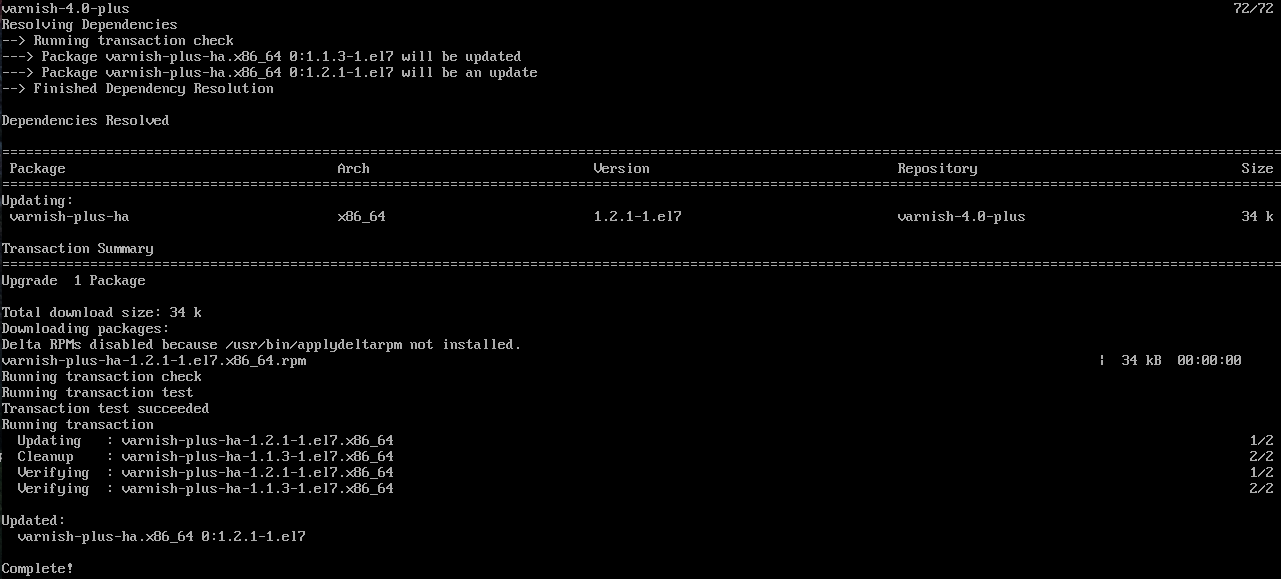
Varnish High Availability Agent 1.2
HTTPie is available on Linux, Mac OS X and Windows. On a Debian or Ubuntu system HTTPie can be installed with apt-get install httpie. For other platforms, see http://httpie.org.
Testing httpie is simple:
http -p Hh http://www.atomictag.comGET / HTTP/1.1
Accept: */*
Accept-Encoding: gzip, deflate
Connection: keep-alive
Host: www.atomictag.com
User-Agent: HTTPie/0.9.2
HTTP/1.1 200 OK
CF-RAY: 250beb7295742666-FRA
Cache-Control: max-age=0, public
Content-Encoding: gzip
Content-Type: text/html; charset=UTF-8
Date: Sun, 06 Dec 2015 23:55:06 GMT
ETag: W/"7524-526422bb3df6c"
Expires: Sun, 06 Dec 2015 23:55:06 GMT
Last-Modified: Sun, 06 Dec 2015 22:22:06 GMT
Pragma: public
Server: cloudflare-nginx
Set-Cookie: __cfduid=dad70ed346cbd17091806e91a67d56c1f1449446106; expires=Mon, 05-Dec-16 23:55:06 GMT; path=/; domain=.atomictag.com; HttpOnly
Transfer-Encoding: chunked
Vary: Accept-Encoding,CookieThe -p option to http can be used to control output. Specifically:
-p H will print request headers.
-p h will print response headers.
-p B will print request body.
-p b will print response body.
Zipnish is a MicroServices Monitor that runs on top of Varnish, currently – the Varnish supported version is 4. Data storage is based on MySQL, therefore a running instance of MySQL server will be required.
Download link: https://github.com/varnish/zipnish
http://www.slideshare.net/Varnish_software/microservices-20-61197134
Improved Security and Proxy Support Complement Streaming Architecture, Which Cuts Down of Delivery Times for Larger Objects and Decreased Latency When Accessing Content Through Cache Hierarchies
Updates to Varnish Cache 4.1 include:
Proactive security features
PROXY protocol support
Warm and cold VCL configurations — Traditionally Varnish has had the concept of active and inactive loaded VCLs. Any loaded VCL lead to state being kept, and a separate set of health checks (if configured) were being run against the backends. To avoid the extra state and backend polling, a loaded VCL is now either warm or cold. Runtime state (incl. backend counters) and health checks are not present for cold VCLs. A warm VCL will automatically be set to cold after vcl cool down seconds.
VMOD backends – Before Varnish 4.1, backends could only be declared in native VCL. Varnish 4.0 moved directors from VCL to VMODs, and VMODs can now also create backends. It is possible to both create the same backends as VCL but dynamically, or create backends that don’t necessarily speak HTTP/1 over TCP to fetch resources.
Backend connection timeout – Backend connections will now be closed by Varnish after backend idle timeout seconds of inactivity. Previously they were kept around forever and the backend servers would close the connection without Varnish noticing it. On the next traffic spike needing these extra backend connections, the request would fail, perhaps multiple times, before a working backend connection was found/created.
Varnish Cache is open source, available under a two-clause BSD license. Varnish Software also delivers additional software and support for more advanced users via subscriptions for Varnish Plus, its premium product. See here.
Online resources
You can download Varnish Cache 4.1 here.
Further details on Varnish Cache 4.1 can be found here.
Sometimes you may want to cache request based on the status code with a different TTL.
Adding the following in the vcl_backend_response will help you in achieving the result:
if (beresp.status == 403 || beresp.status == 404 || beresp.status >= 500)
{
   set beresp.ttl = 60s;
}

|
||||||||||||||||||||||||
Sometimes in certain occasion you need to manage a complete redirection to an external site directly from Varnish.
Following you will find how to implement this using Varnish 4.0 and some specific rules in the VCL.
sub force_redirect {
   set req.http.host = "www.atomictag.com";
   return(synth(750, "Force redirection to external site."));
}

sub vcl_recv {
   # Force redirect
   call force_redirect;
   # Everything else will be ignored
}

sub vcl_synth {
   # Managing redirection
   if (resp.status == 750) {
      set resp.status = 301;
      set resp.http.Location = "http://www.atomictag.com/";
      return(deliver);
   }
}
Of course you can easily add more intelligence to the VCL, e.g.: by evaluating the redirection based on the http referrer or on a specific hostname.