
SSL in Varnish Cache Plus

Loading

Varnish Software announced that they finished implementing SSL in Varnish Cache Plus.

The release will happen at at Varnish summit in Silicon Valley in early June.

Varnish Cache Plus is both a HTTP server and a HTTP client and both implementations will have SSL enabled. The HTTP Server, ie the client facing SSL is perhaps the most significant one, enabling Varnish Cache Plus to encrypt traffic between the client and Varnish.

Read more at: SSL in Varnish Cache Plus
Enable VCL variables logging

Loading

Varnish Cache offers several ways to log and most of the documentation is related to varnishlog which includes several information related to request, response and backend response. Now what’s happen if we need to log our own variables or message to a file?

The key function is std.syslog enabled via std (standard) Varnish module, which is the only built-in “vmod” and is thus natively available and doesn’t have to be compiled.

 import std; 

then you can easily add into your VCL the following line:


std.syslog(180, "log description");

The first parameter, 180, is the priority value. If you want to add some variables to your log message:


std.syslog(180, "log description" + beresp.ttl);

This will logo the message to general system log, which is often, in a Linux system, is located in /var/log/messages.

Monitoring heart beat in Varnish Cache

Loading

In order to know Varnish Cache if is running and able to handle HTTP requests properly, without having the backends as part the equation please add the following VCL snippet makes sure that the URL /heart-beat always returns 200:

Varnish 4 equivalent:


sub vcl_recv {
if (req.method == "GET" && req.url == “/heart-beat") {
   return(synth(200, "OK"));
   }
}

Varnish 3 equivalent:


sub vcl_recv {
if (req.request == "GET" && req.url == "/heart-beat") {
    error 200 "OK";
   }
}

You may want to protect the URL by using ACLs if you don’t want to expose /heart-beat to the public.

Please see original page: https://www.varnish-software.com/blog/blog-sysadmin-monitoring-health-varnish-cache

vclFiddle for Varnish Cache

Loading

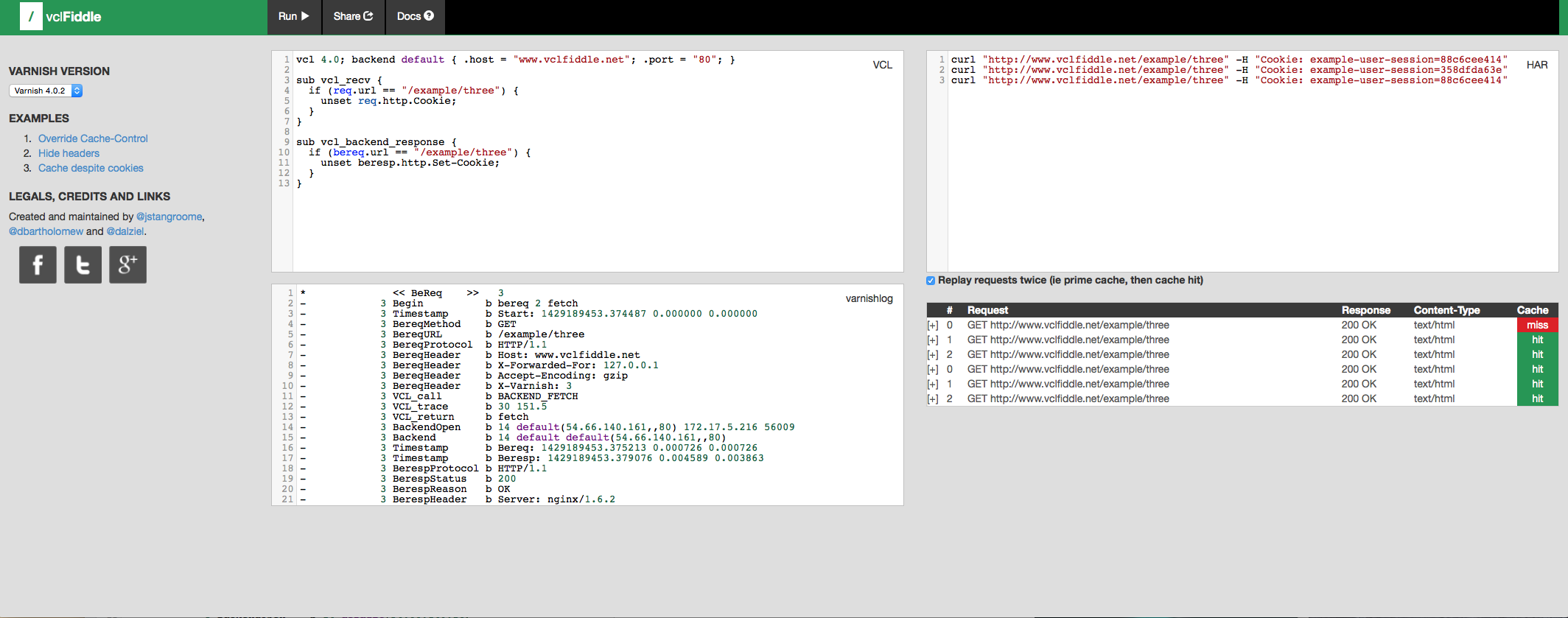
vclFiddle, is a free online tool for experimenting with the Varnish Cache HTTP reverse-proxy in a sandboxed environment where you can reproduce a website caching scenario for testing, collaborative debugging, or just trying new ideas, with the least friction possible.

You can use it now at http://www.vclfiddle.net and it is open-sourced on GitHub too.

vcl-fiddle

vcl-fiddle

Easy reloading of Varnish VCL

Loading


#!/bin/bash
# Reload a varnish config

FILE="/opt/varnish/etc/config/default.vcl"

# Hostname and management port
# (defined in /etc/default/varnish or on startup)
HOSTPORT="localhost:2000"
NOW=`date +'%d/%m/%Y_%H:%M:%S:%N'`

error() {
   echo 1>&2 "Failed to reload $FILE."
   exit 1
}

varnishadm -T $HOSTPORT -S /opt/varnish/etc/secret vcl.load reload_$NOW $FILE || error
varnishadm -T $HOSTPORT -S /opt/varnish/etc/secret vcl.use reload_$NOW || error
echo Current configs:
varnishadm -T $HOSTPORT -S /opt/varnish/etc/secret vcl.list

Varnishadm: how to load a new VCL without restarting

Loading

Connect via Varnishadm to Varnish instance:


$ varnishadm -T varnish_server_ip:varnish_server_admin_port -S /opt/varnish/etc/secret
200
-----------------------------
Varnish Cache CLI 1.0
-----------------------------
Linux,3.18.7+,armv6l,-smalloc,-smalloc,-hcritbit
varnish-4.0.3 revision b8c4a34

Type 'help' for command list.
Type 'quit' to close CLI session.
varnish>

Display currently load VCL by using vcl.list command:


varnish>vcl.list
200
active          0 boot
varnish>

Load & compile new VCL by using vcl.load command:


varnish> vcl.load new_vcl "/opt/varnish/etc/config/new_vcl.vcl"
200
VCL compiled.
varnish>

Use the new VCL by using vcl.use command:


varnish> vcl.use new_vcl
200
VCL 'new_vcl' now active
varnish>

Check loaded & active VCL by using vcl.list command:


varnish> vcl.list
200
available       0 boot
active          0 new_vcl
varnish> 

Remove the old VCL by using vcl.discard command:


varnish> vcl.discard boot
200
varnish>

Varnish 4: a simple start.sh script

Loading

I have created a very simple start.sh script that helps to run Varnish 4.0 on our servers.

Please note that we also created a very simple logfile to check HIT/MISS requests.


#! /bin/sh
pkill varnishd
echo 'Killed Varnishd daemon'
pkill varnishncsa
echo 'Killed Varnishcsa log daemon'

ulimit -n 10240
ulimit -l 16384

/usr/local/sbin/varnishd \
	-a : \
	-T localhost:2000 \
        -t 120 \
	-S /opt/varnish/etc/secret \
	-n varnish \
        -p thread_pool_min=30 -p thread_pool_max=500 -p thread_pool_timeout=300 \
	-f /opt/varnish/etc/config/default.vcl \
	-s malloc,1G -l 8m,1m,+

echo 'Started Varnishd daemon'
sleep 10
/usr/local/bin/varnishncsa -F '%U%q %{Varnish:hitmiss}x' -w /opt/varnish/logs/requests.log -n varnish&
echo 'Started Varnishcsa log daemon'

Configure PURGE in VCL 4.0

Loading

In order to configure PURGE add this lines into your VCL_RECV:

vcl 4.0;
import std;

sub vcl_recv {

  # Allow banning  
  if (req.method == "PURGE") {
     # Same ACL check as above:
     if (!client.ip ~ purge) {
        return(synth(405, "This IP is not allowed to send PURGE requests."));
     }
     ban("req.http.host == " + req.http.host + " && req.url == " + req.url);
     # If you got this stage (and didn't error out above), purge the cached result
     return (synth(200, "Purged"));
  }

}

To test it:

$ curl -v -k -H "host: www.mydomain.com" -X PURGE http://varnish_server_ip/

Remember to add ACL into your files

Force cache and leverage browser caching for non cachable contents

Loading

Add this code in the VCL_BACKEND_RESPONSE:


sub vcl_backend_response {

  # client browser and server cache
  # Force cache: remove expires, Cache-control & Pragma header coming from the backend
  if (beresp.http.Cache-Control ~ "(no-cache|private)" || beresp.http.Pragma ~ "no-cache")  {
     unset beresp.http.Expires;
     unset beresp.http.Cache-Control;
     unset beresp.http.Pragma;
              
     # Marker for vcl_deliver to reset Age: /
     set beresp.http.magicmarker = "1";
     
     # Leveraging browser, cache set the clients TTL on this object /
     set beresp.http.Cache-Control = "public, max-age=2592000";
	 
     # cache set the clients TTL on this object /        
     set beresp.ttl = 30d;  

     # Allow stale content, in case the backend goes down.
     # make Varnish keep all objects for 6 hours beyond their TTL
     set beresp.grace = 6h;
     return (deliver);
  }

}

Also add this in the VCL_DELIVER:


sub vcl_deliver {
# Called before a cached object is delivered to the client.
	
  if (resp.http.magicmarker) {
	unset resp.http.magicmarker;
	# By definition we have a fresh object 
	set resp.http.Age = "0";
	}
    
  if (obj.hits > 0) { # Add debug header to see if it's a HIT/MISS and the number of hits, disable when not needed
    set resp.http.X-Cache = "HIT";
  } else {
    set resp.http.X-Cache = "MISS";
  }
  # Please note that obj.hits behaviour changed in 4.0, now it counts per objecthead, not per object
  # and obj.hits may not be reset in some cases where bans are in use. See bug 1492 for details.
  # So take hits with a grain of salt
  set resp.http.X-Cache-Hits = obj.hits;
  
  # Set Varnish server name
  set resp.http.X-Served-By = server.hostname;

  # Remove some headers: PHP version
  unset resp.http.X-Powered-By;

  # Remove some headers: Apache version & OS
  unset resp.http.Server;
  unset resp.http.X-Varnish;
  unset resp.http.Via;
  unset resp.http.Link;
  unset resp.http.X-Generator;

  return (deliver);
}

Retrieve WordPress logged in username, store it in a custom http x-header and clean cookie

Loading


vcl 4.0;
import std;

sub vcl_recv {

  # Retrieve WordPress logged in username, store it in a custom http x-header and clean cookie
  if (req.http.Cookie ~ "wordpress_logged_in")  {      
     set req.http.X-UserID = regsuball(req.http.Cookie, "^.*wordpress_logged_in_[^=]+[^;]=([^;]*);*.*$", "\1");
     set req.http.X-UserID = regsuball(req.http.X-UserID, "%7C.*", "");
     # Remove wordpress_logged_in and wordpress_ cookies
     set req.http.Cookie = regsuball(req.http.Cookie, "wordpress_logged_in_[^=]+[^;]+(; )?", "");
  } 

}